Templates
Customise how AI generates your listings. Set brand voice, formatting, and instructions per marketplace.
Templates control how Shopfront's AI writes your listings. Each template defines the tone, format, and style for a specific marketplace — so your eBay listings sound professional while your Depop listings stay casual.
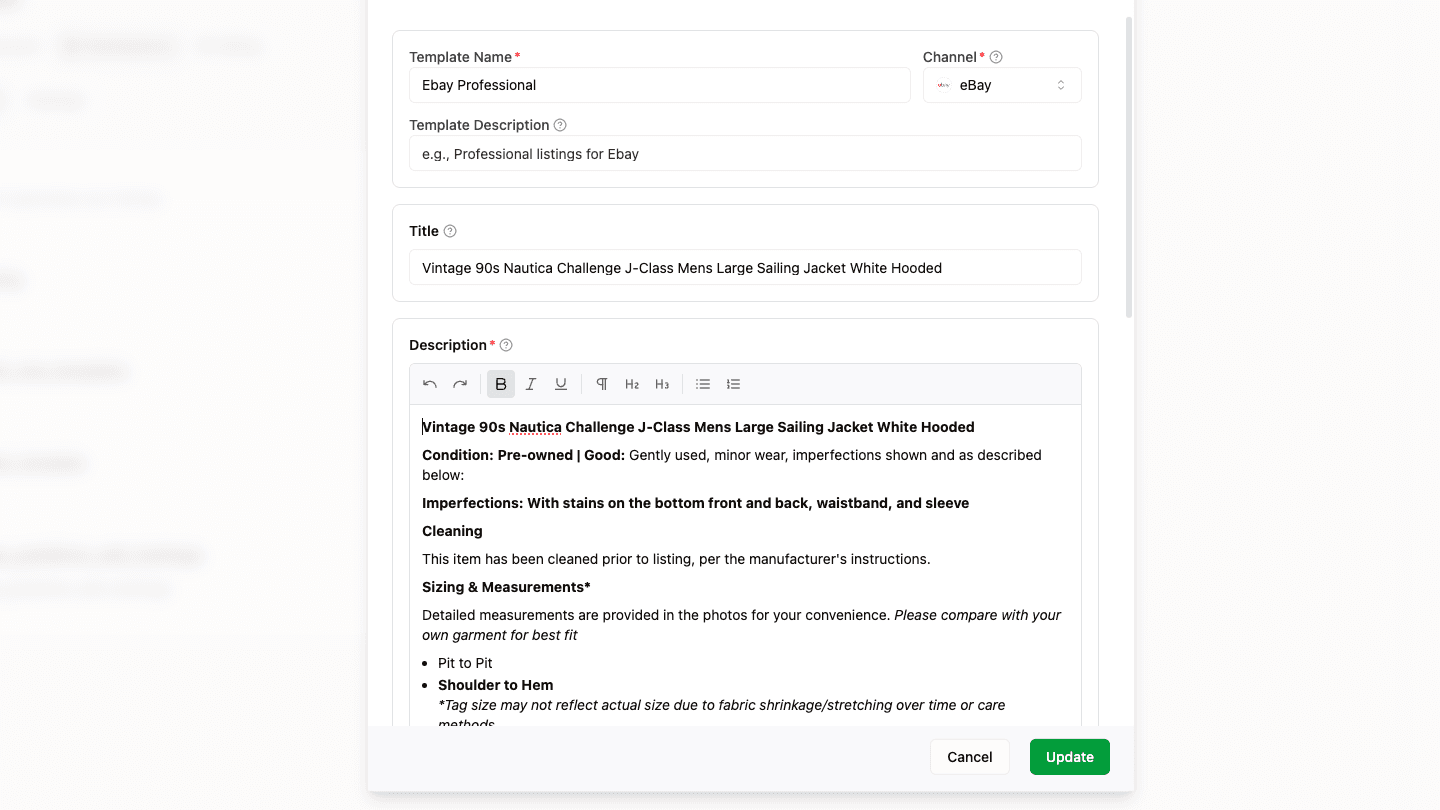
What's in a Template
- Brand voice — The overall tone and personality (e.g., "professional and trustworthy" or "casual and friendly")
- Subject expertise — Domain context for the AI (e.g., "experienced vintage clothing specialist")
- Title instructions — Formatting rules and character limits per marketplace
- Description instructions — Content guidelines, style (concise, detailed, or story-driven), and format (HTML or plaintext)
- Custom instructions — Freeform guidance like "always mention flaws" or "include measurements"
- Example products — Sample titles and descriptions the AI uses as reference when generating
Template Variables
Your title and description examples can include variables — placeholders like {{brand}} that each listing fills in with its own values. The AI writes the listing around the placeholder and Shopfront substitutes the real data afterwards, so the value comes from your product rather than the AI's imagination.
This matters most for details that must be reported exactly rather than written creatively — a SKU read off a label, or measurements read from a tape measure in your photos.
Syntax
{{brand}}           Nike — or "Unbranded" when the brand is unknown
{{brand|Designer}}  Nike — or "Designer" when the brand is unknown
{{brand|}}          Nike — or nothing at all when the brand is unknown
Every variable has a default that's used when the product has no value for it. Add | inside the braces to choose your own default, or | followed by nothing to leave the gap empty.
Variable names are lowercase and case-sensitive — {{sku}} works, {{SKU}} does not. Anything Shopfront doesn't recognise is left exactly as you typed it, so {{colourway}} reaches your listing as the literal text {{colourway}}. The template editor flags unrecognised variables as you type.
Spaces inside the braces are fine — {{ brand }} behaves the same as {{brand}}.
Available Variables
Filled in for every listing.
| Variable | Contains | Default |
|---|---|---|
{{title}} | Product title | Product |
{{description}} | Full product description | empty |
{{brand}} | Brand name | Unbranded |
{{condition}} | Condition, e.g. New with Tags, Excellent | Pre-owned |
{{origin}} | Country of manufacture | empty |
{{source}} | Where the item came from, e.g. retail, thrift, vintage | empty |
{{gender}} | Men, Women, Unisex or Kids | empty |
Filled in when the code is legible in your photos.
| Variable | Contains | Default |
|---|---|---|
{{sku}} | SKU read from a label or price sticker | empty |
{{mpn}} | Manufacturer Part Number | empty |
{{gtin}} | Barcode number | empty |
{{sku}} is a code Shopfront actually read off the item — a label or price sticker in your photos. If you don't sticker your stock it stays empty, and the SKU line is dropped from the listing rather than filled with an invented code.
Filled in for clothing and accessories, where the matched category defines them.
| Variable | Contains | Default |
|---|---|---|
{{size}} | Size, e.g. M, UK 9 | One Size |
{{colour}} | Primary colour | empty |
{{material}} | Fabric or material | empty |
{{pattern}} | Pattern, e.g. solid, striped | empty |
{{neckline}} | Neckline style — tops only | empty |
{{sleeve}} | Sleeve length or type — tops only | empty |
{{measurements}} | Auto-detected measurements in centimetres | empty |
{{measurements}} renders as a single line of Label: value pairs in a consistent order — Pit to pit: 52 cm, Waist: 40 cm, Length: 71 cm.
| Variable | Contains | Default |
|---|---|---|
{{category}} | Product category path | empty |
Non-apparel items have no size, colour or measurements to fill in, so those variables fall back to their defaults. Give them a fallback that reads well for your categories, or leave them out of templates you use for non-clothing.
Starter Templates
Shopfront includes seven pre-built templates based on what works best on each marketplace:
Clean & Factual
- Plaintext, accurate and structured — no hype or filler
- The base listing every marketplace channel derives from
- 200-character title limit
- Uses
{{measurements}}so detected tape readings land in the listing - Ideal as your starting point if you sell across several channels
Professional & Detailed
- HTML-formatted descriptions with structured sections
- Thorough, trustworthy tone — pyramid structure (key details first)
- 80-character title limit
- Ideal for buyers searching by specifics
Casual & Friendly
- Plaintext descriptions, conversational style
- Gen Z-friendly tone — relaxed and approachable
- 50-character title limit
- Uses
{{measurements}}so detected tape readings land in the listing - Ideal for trend-driven and vintage items
Streetwear Expert
- Plaintext with detailed measurements, via
{{measurements}} - Authentication and condition focus
- Brand-forward titles, 50-character title limit
- Ideal for streetwear, designer, and archive pieces
Product Showcase
- HTML-formatted, professional and SEO-optimised
- Clean product descriptions for your own storefront
- 255-character title limit
- Ideal for building your brand presence
Local & Friendly
- Plaintext only — Facebook renders HTML tags literally
- Leads with the practical details: condition, size, pickup or shipping
- 100-character title limit
- Ideal for local, mobile-first buyers
Luxury & Authenticated
- Plaintext, catalogue-style — provenance first
- Leads with authentication signals: date codes, made-in, receipts
- 20-character title limit — Vestiaire builds the public title from brand and category
- Uses
{{measurements}}so detected tape readings land in the listing - Ideal for luxury pieces heading into Vestiaire's authentication queue
Start with a starter template and customise it, or create your own from scratch.
Per-Marketplace Configuration
Templates are designed to be one per marketplace. During listing generation, you select which template to use for each connected channel. This means the same product can be described differently across eBay, Depop, Grailed, Shopify, and Vestiaire Collective — matching the expectations of each platform's audience.
Set a default template per marketplace so it's automatically applied to new listings.
Using Templates
Templates are applied during AI listing generation:
- Upload your product photos
- Select a template for each marketplace (or use your defaults)
- AI generates titles, descriptions, and attributes guided by your template settings
- Review and edit before publishing
Templates are managed from Settings → Templates where you can create, edit, duplicate, and set defaults.
Your first template for each marketplace is automatically set as the default. You can change defaults at any time from the Templates settings page.
AI Listing Generation
Upload photos and generate marketplace-ready listings with AI. Titles, descriptions, categories, and attributes — across all your channels at once.
Cross-Channel Previews
See exactly how your listings will appear on each marketplace before you publish. Edit titles, prices, and attributes per channel.